
The document contains a simplified Chinese version of product information. Further analysis is needed to determine the features and characteristics of the product.
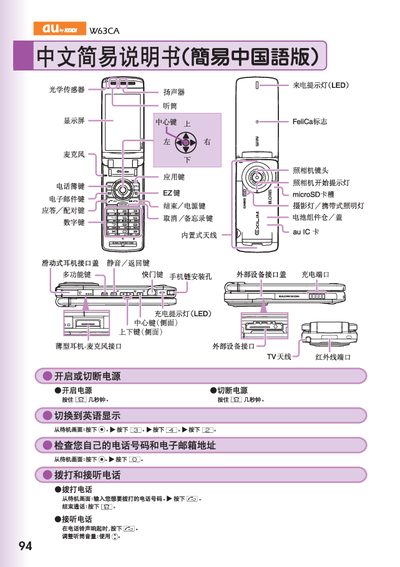
The manual describes the layout of the W63CA handset, including the display, central and side keys, volume controls, LED indicators, FeliCa logo, microSD card slot, camera lens, and charging port. It also shows how to switch the interface language to English and how to power the device on and off.
Operational instructions cover making and receiving calls, saving and viewing contacts, using the built‑in camera for snapshots and animations, managing voice mail, setting audio mode, and handling international dialing. Additional sections explain how to use the FeliCa function, external device interfaces, and how to access the phone’s data storage. This manual is written in Chinese.
| MicroSD card slot | Present |
|---|---|
| LED call indicator | Present |
| FeliCa support | Supported |
Hold the camera button for more than one second, then press the shutter key to start shooting; press the stop key to end and the save key to store the image.
From the standby screen, press the menu key, select the contact entry you want to edit, then choose the register option to input and save the new contact data.