
This document is a simple English version of the user manual, which explains how to turn the power on and off, apply default settings, check your own phone number and email address, make and answer calls, store and recall address book data, etc.
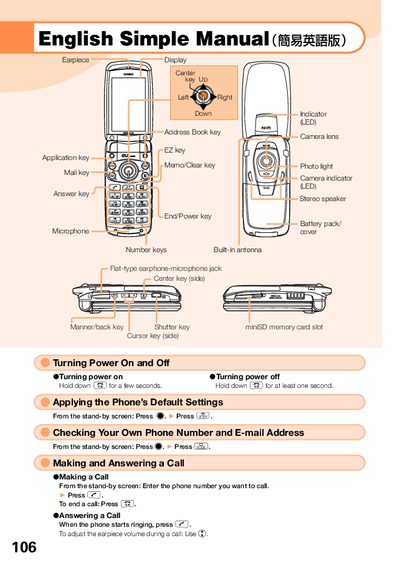
This manual provides step‑by‑step instructions for turning the phone on and off, applying default settings, checking your own phone number and e‑mail address, and making or answering calls. It also explains how to store and recall address‑book entries and how to use the built‑in camera for both movies and snapshots.
Additional sections cover making international calls, configuring English voice‑mail prompts, and using handy features such as Manner Mode and the Take‑A‑Message voice recording function. Contact information for au Customer Service is included at the end.
| Earphone jack type | Flat‑type |
|---|---|
| Antenna | Built‑in |
Hold down the power key (2) for a few seconds to turn the phone on, and hold down (42) for at least one second to turn it off.
From the stand‑by screen, enter the international access code, then the country code, followed by the area code and the phone number, and press the call key.
From the stand‑by screen, hold down the shutter key for at least one second, then press the shutter button to capture the image and store it with the store key.