
This document describes the features and characteristics of a product in English/Chinese.
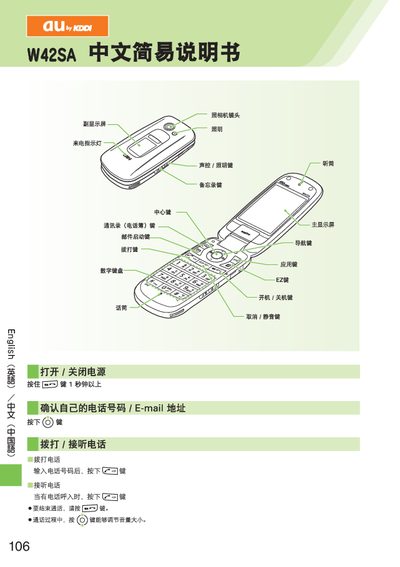
This manual explains how to power the device on and off, place and receive calls, and adjust call volume. It also covers adding, viewing, and editing entries in the address book.
Additional sections describe how to set up and use EZweb email, C‑mail, browse the Internet with EZweb, operate the built‑in camera for photos and video, make international calls, and enable or disable silent and voicemail modes. This manual is written in Chinese.
Enter the telephone number and press the call key to start the call.
When a call comes in, press the answer key to answer the call.
Hold the appropriate key, select "Add New Record", then enter the name, phone number, and other details.
Press the camera key, select the photo mode, and press the capture key to take a picture.