
This is an English manual, which mainly introduces the power on/off, date and time setting, making a call/answering a call, checking your own phone number and email address.
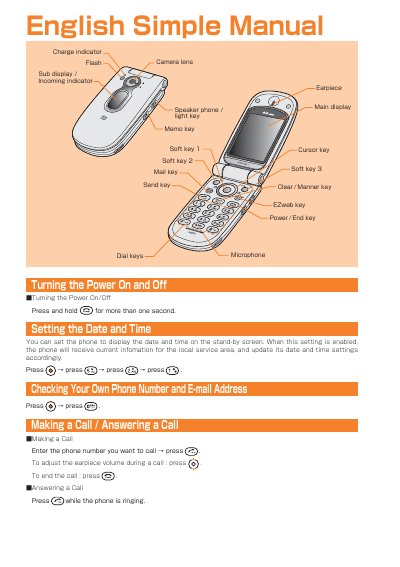
This manual provides step‑by‑step instructions for using the au by KDDI A5507SA phone. It explains how to turn the device on and off, set the date and time, make and answer calls, and manage the address book.
Additional sections cover email and EZweb setup, sending and receiving messages, using the camera for photos and video, making international calls, and enabling optional features such as English voice prompts and voice recording.
Press and hold the power key for more than one second.
Press ©, then (G3), then @E), then G to enable the setting.
Press ©, then & to select Camera, then © > press (1%) and press © to capture the photo.