
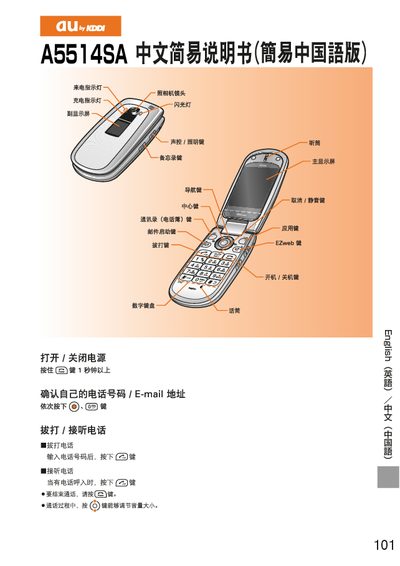
au A5514SA User Manual


au A5514SA User Manual - cover page
Brand
au by KDDI
Category
Cell Phones
Document type
User Manual
Language
Chinese
Pages
3
File format
PDF
File size
1.3 MB
Published
27 March, 2012
Updated
30 September, 2023
MD5 checksum
BF287F7481F060DCFA753E95F1861AB7

About this manual

This manual explains how to operate the au A5514SA mobile phone. It covers basic functions such as dialing, answering calls, adjusting volume, and ending calls, as well as how to navigate the menu and use the phone's built‑in features.

Detailed sections describe adding and viewing contacts, setting up and using EZweb and C‑mail services, capturing photos and videos with the camera, making international calls, and configuring mute and voicemail modes. This manual is written in Chinese.

What's inside

  • Making and Answering Calls
  • Managing Contacts
  • EZweb Email Setup and Use
  • C‑mail Usage
  • Camera Operation
  • International Calls
  • Mute Mode
  • Voicemail

Frequently asked questions

How can I end a call?

Press the [E] key during a call to hang up.

How do I add a new contact?

Hold the * key, select "Add", then enter the name, phone number, email and category as prompted.

Download PDF (1.3 MB)

More au by KDDI Manuals


View all au by KDDI manuals →