
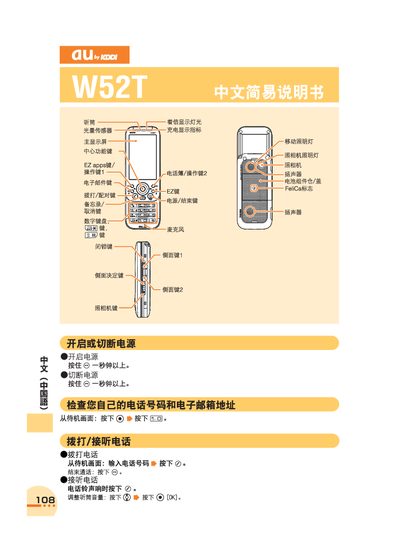
This manual provides step‑by‑step instructions for operating the au W52T mobile phone. It explains how to power the device on and off, make and receive calls, manage the phonebook, and use additional features such as voice mail and international dialing.
The guide also covers camera functions for taking photos and recording animations, audio settings, and how to contact au customer service for support. All instructions are presented with the corresponding button presses shown on the device’s display. This manual is written in Chinese.
Press and hold the @ key for more than one second to turn the phone on, and press and hold the @ key for more than one second again to turn it off.
From the standby screen, press the @ key, enter the telephone number, then press the @ key again to start the call.
From the standby screen, press the G@ key to access the voice‑mail settings and select the English language prompt.