
Key facts
Start here
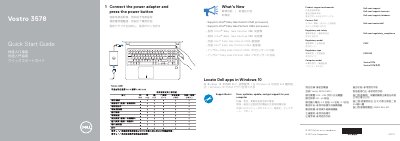
Dell Vostro 3578 Laptop Quick Start Guide
This quick start guide is for the Dell Vostro 3578 laptop. It explains how to connect the power adapter and press the power button, and provides links to Dell product support, manuals, contact information, and regulatory and safety details.
The guide lists what’s new, including support for Intel Kaby Lake Celeron UMA and Pentium UMA processors, and shows how to locate Dell apps in Windows 10 such as SupportAssist. A features section identifies the camera, ports, speakers, touchpad, and other parts of the computer.
Dell Vostro 3578 specifications
| Processor support | Intel Kaby Lake Celeron UMA processors |
|---|---|
| Processor support | Intel Kaby Lake Pentium UMA processors |
| USB 2.0 port | Present |
| USB 3.1 Gen 1 ports | Present |
| Memory card reader | Present |
| Fingerprint reader | Optional |
All Dell Vostro 3578 documents by type
The shortest path to a working setup, usually only a few pages.
- Dell Vostro 3578 Laptop Quick Start Guide 2 p
- Dell Vostro 3578 Quick Start Guide 2 p
- Dell Vostro 3578 Laptop Quick Start Guide 2 p
- Dell Vostro 3578 Computer Quick Start Guide 2 p
- Dell Vostro 3578 Laptop Quick Start Guide 2 p
- Dell Vostro 3578 Laptop Quick Start Guide 2 p
- Dell Vostro 3578 Laptop Quick Start Guide 2 p
- Dell Vostro 3578 Quick Start Guide 2 p
- Dell Vostro 3578 Quick Start Guide 2 p
- Dell Vostro 3578 Quick Start Guide 2 p
Questions answered in these manuals
How do I start the Dell Vostro 3578?
Connect the power adapter and press the power button.
Which Intel processors does the Dell Vostro 3578 support?
It supports Intel Kaby Lake Celeron UMA processors and Intel Kaby Lake Pentium UMA processors.
Where can I find Dell product support and manuals?
The guide lists Dell.com/support and Dell.com/support/manuals.
How do I contact Dell?
The guide points to Dell.com/contactdell.
How do I start the Dell Vostro 3578?
Connect the power adapter and press the power button.
Where can I find Dell product support and manuals?
Visit Dell.com/support, Dell.com/support/manuals, or Dell.com/support/windows.