
Key facts
Start here
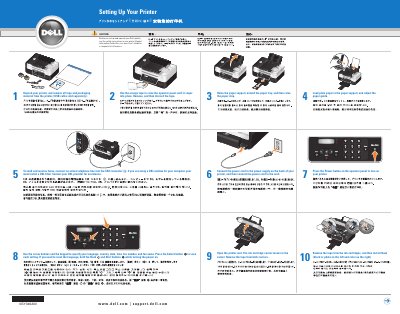
Dell V505 Printer Setup Guide
The Dell V505 Printer Setup Guide provides essential instructions for the initial installation of the device. It covers physical preparation, including removing packaging material and connecting power and telephone lines for faxing.
The guide also details the process for installing ink cartridges, configuring system settings such as language and date, and installing the necessary drivers and utilities via CD.
All Dell V505 documents by type
The shortest path to a working setup, usually only a few pages.
Mounting, wiring and first power-up. Read it before the hardware goes in.
Day-to-day operation, settings and troubleshooting. Start here if the product is already set up.
Questions answered in these manuals
How do I reset the language on the Dell V505?
To reset the language, hold the Back and Start buttons while turning the power on.
What should I do if I use a DSL modem for my computer?
You must install a DSL filter when connecting an active telephone line into the FAX connector.
Is a USB cable included with the printer?
A USB cable is included with wireless printers; otherwise it is sold separately.
How do you reset the language on the printer?
Hold the Back and Start buttons while turning the power on.
How do I reset the language on the Dell V505 printer?
Hold the Back and Start buttons while turning the power on.
What should I do if phone communication is serial in my country?
Remove the blue plug from the PHONE jack connector and insert the yellow terminator supplied with the documentation.