
Dell™ Laser Printer P1500 User's Guide
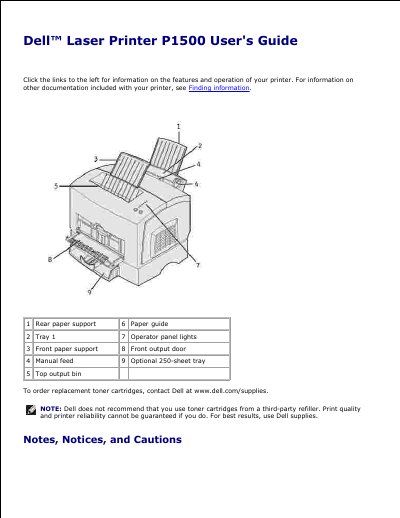
This guide covers the Dell P1500 laser printer, including its features, operator panel, cable requirements, toner cartridge replacement, and supply conservation. It also provides printer specifications such as memory, emulations, compatibility, connectivity, duty cycle, and printer life.
The printer includes tray 1 for up to 150 sheets, a manual feed for single sheets, an optional 250-sheet tray, top and front output paths, and operator panel lights and buttons. Supported connections include parallel and USB, with compatibility listed for Windows 98/Me, Windows 2000, Windows NT 4.0, and Windows XP.
| Base memory | 16MB |
|---|---|
| Maximum memory | 144MB |
| Emulations | PostScript 3, PCL 6 |
| Compatibility | Windows 98/Me, Windows 2000, Windows NT 4.0, Windows XP |
| Connectivity | Parallel and USB |
| Ships with toner cartridge yield | approximately 3,000 pages at 5% coverage |
| Duty cycle (average) | 800 pages/month |
| Duty cycle (maximum) | 10,000 pages/month |
| Printer life | 120,000 pages or 5 years (Letter size, 5% coverage) |
| Tray 1 capacity | up to 150 sheets of paper or 10 sheets of specialty media |
Turn the printer off, open the upper front door, press and hold Continue while turning the printer on, release Continue when the lights cycle, close the door, then press and release Continue until all lights cycle.
It supports Windows 98/Me, Windows 2000, Windows NT 4.0, and Windows XP.
Change the Print Darkness setting in the printer driver and select the Very Light setting.
The maximum memory is 144MB.