
Dell™ P1500 Laser Printer User's Guide
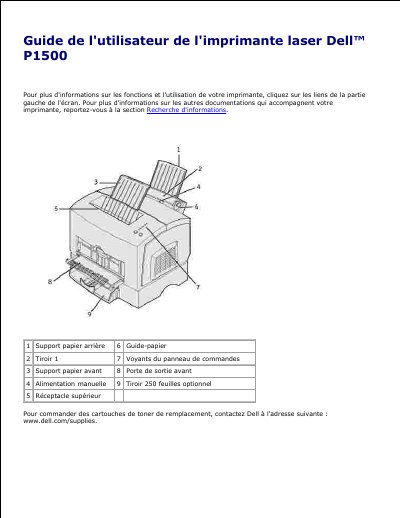
This is the French user guide for the Dell P1500 laser printer. It describes the printer's parts, including the paper trays, manual feed, output bin, control panel lights and buttons, and explains how to load paper and select a suitable interface cable.
The document also covers software installation, toner ordering, printing the printer configuration sheet, safety notices, warranty and service information, FCC regulatory compliance, and ENERGY STAR qualification. This manual is written in French.
| Paper capacity (Tray 1) | Up to 150 sheets of paper |
|---|---|
| Optional paper tray | 250-sheet optional tray |
| Control panel | Six indicators and two buttons |
| Laser class | Class I |
| Laser output | 5 milliwatts gallium arsenide laser |
| Interface cables | USB 2.0 and IEEE-1284 parallel |
| FCC classification | Class B digital device |
Dell recommends using Dell toner cartridges and provides no warranty for print quality or reliability with other brands.
The control panel has six indicators and two buttons, including Continue and Cancel.
The printer connection cable must meet USB 2.0 or IEEE-1284 parallel requirements.
Yes, Dell Computer Corporation verified that the product satisfies ENERGY STAR energy-saving standards.