
Dell Inspiron 14-3442 Laptop Quick Start Guide

An introduction to the appearance of the Dell Inspiron 14-3442 laptop.
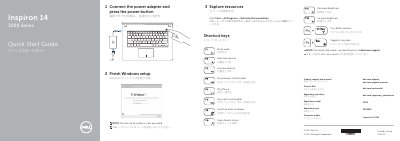

Dell Inspiron 14-3442 Laptop Quick Start Guide - cover page
Brand
DELL
Category
Laptops
Document type
Quick Start Guide
Language
English
Pages
2
File format
PDF
File size
221 KB
Published
19 November, 2023
Updated
19 November, 2023
MD5 checksum
173A05572DAAE9E55AF9F93958F6D0E1

About this manual

This quick start guide is for the Dell Inspiron 14-3442 laptop (Inspiron 14 3000 Series). It shows how to connect the power adapter, finish Windows setup, use shortcut keys, and identify exterior features and ports. It also lists product support, manual, regulatory and service tag information.

What's inside

  • Shortcut keys
  • Connect the power adapter and press the power button
  • Finish Windows setup
  • Explore resources
  • Features
  • Product support and manuals
  • Regulatory and safety

Specifications

Computer modelInspiron 14-3442

Frequently asked questions

What should I avoid when creating a Windows password?

Do not use the @ symbol in your password.

How do you start setting up the laptop?

Connect the power adapter and press the power button.

What symbol should not be used in a Windows password?

Do not use @ symbol.

Does the laptop have a USB 3.0 port?

Yes, a USB 3.0 port is listed among its features.

Download PDF (221 KB)

More DELL Manuals


View all DELL manuals →