
Key facts
Start here
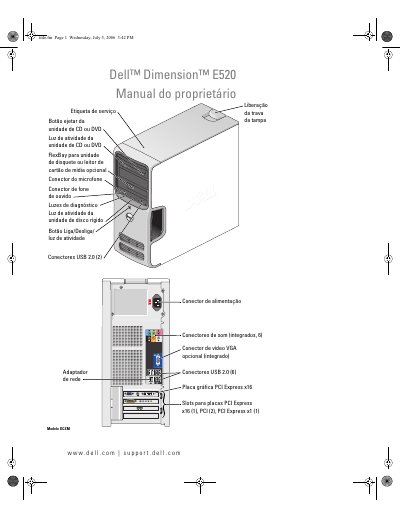
Dell Dimension E520 Owner's Manual
This manual provides instructions for the Dell Dimension E520 computer, including setup and usage of the system, such as connecting printers, internet, and media drives. It details how to adjust volume and image settings, copy CDs and DVDs, and use optional media card readers. This manual is written in Portuguese.
Read onlineDell E520 specifications
| Slots for PCI Express x16 | 1 |
|---|---|
| Slots for PCI Express x1 | 1 |
| USB 2.0 connectors (front) | 2 |
| USB 2.0 connectors (rear) | 6 |
| Audio connectors | 6 |
All Dell E520 documents by type
Disassembly, diagnostics and part numbers, for repair.
Day-to-day operation, settings and troubleshooting. Start here if the product is already set up.
Questions answered in these manuals
What are the notes, warnings, and cautions in this manual?
NOTAS provide important information to help use the computer better, AVISO messages inform about possible hardware damage or data loss, and CUIDADO messages indicate possible property damage or personal injury.
Where can I find the service tag and express service code?
These labels are located on the computer and should be used to identify the computer when visiting the support website or contacting support.
What is the power rating of the Dell Dimension E520?
The system uses a 305 W power supply.
What are the physical dimensions of the Dell Dimension E520?
The computer measures 41.4 cm high, 18.8 cm wide, and 45.7 cm deep.