
Key facts
Start here
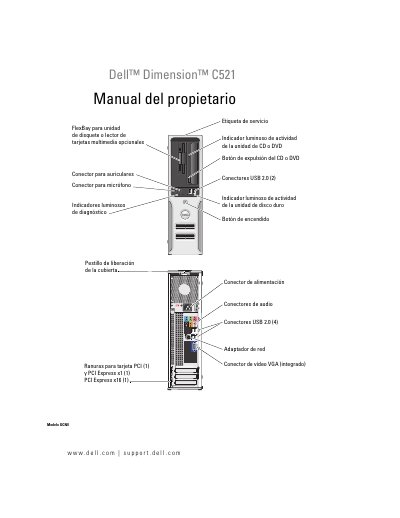
Dell Dimension C521 Optional Floppy Drive or Media Card Reader FlexBay Manual
This document is the Spanish user manual for the Dell Dimension C521 desktop computer. It provides comprehensive instructions on locating information, installing and using the computer, and configuring peripherals such as printers and network connections. The guide also details how to use optional media, including CD/DVD drives and the optional media card reader. This manual is written in Spanish.
Read onlineDell Dimension C521 specifications
| Processor | AMD Athlon 64 X2 Dual‑Core |
|---|---|
| Memory Type | DDR2 SDRAM |
| Supported Memory Modules | 256 MB, 512 MB, 1 GB (non‑ECC) |
| Maximum Memory | 4 GB |
| Power Supply | 280 W |
| Dimensions (H×W×D) | 11.4 cm × 39.9 cm × 35.3 cm |
| Weight | 10.4 kg |
| Operating Temperature | 10 °C to 35 °C |
Source: Dell Dimension C521 User Manual
All Dell Dimension C521 documents by type
Day-to-day operation, settings and troubleshooting. Start here if the product is already set up.
Questions answered in these manuals
What is the maximum memory supported by the Dell Dimension C521?
The system supports up to 4 GB of memory.
How do I identify my specific computer?
You can use the service label located on the computer to identify it when contacting support.
Where can I find drivers and utilities for this computer?
Drivers and utilities are available on the optional CD Drivers and Utilities or on the support.dell.com website.
What type of memory does the Dimension C521 use?
It uses DDR2 SDRAM running at 533 MHz, 667 MHz or 800 MHz (if available), installed in four memory connectors.
What is the maximum amount of memory the computer supports?
The maximum memory is 4 GB.
How do I replace the battery?
The manual includes a "Replace battery" section on page 86 that explains the procedure.