
Dell Venue Keyboard Folio Quick Start Guide.
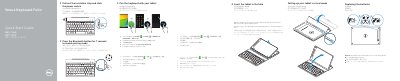
Quick Start Guide for the Dell Venue Keyboard Folio. It covers pairing the keyboard with a tablet, replacing batteries, inserting the tablet into the folio, and setting up the tablet in stand mode.
The guide also identifies keyboard features and shortcut keys, including media, brightness, volume, and app controls, and lists the regulatory model KW14M01.
| Regulatory model | KW14M01 |
|---|
Press the Bluetooth button for 7 seconds to enable pairing mode, then on the tablet open All Apps, Settings, WIRELESS & NETWORKS, Bluetooth, enable Bluetooth, tap Dell Venue Keyboard, and follow the on-screen instructions.
Yes, the batteries are installed when you receive the keyboard.
With the speaker on the left side, align the tablet base with the bottom of the tablet case and snap the tablet in place.