
The Dell Powered USB Hub User Guide introduces the features and specifications of the product.
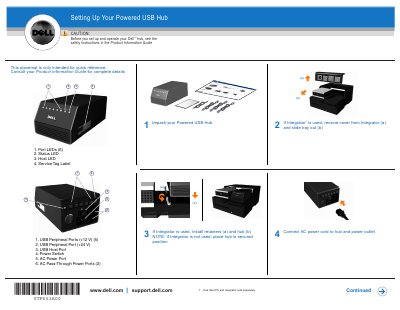
This two-page Dell placemat is a quick-reference setup sheet for the Powered USB Hub. It walks through ten numbered steps, from unpacking the hub and installing it in an optional Integrator, to connecting AC power, AC pass-through power cords, the USB host cable and peripheral cables, and finally turning on the power switch.
The placemat also identifies the hub's parts and ports, including the +12 V and +24 V USB peripheral ports, host port, power switch and LED indicators, and notes that Windows installs drivers for connected devices. It is intended for quick reference only; complete details are in the Product Information Guide, and the host PC and Integrator are sold separately.
| USB Peripheral Ports (+12 V) | 5 |
|---|---|
| USB Peripheral Port (+24 V) | 1 |
| USB Host Port | 1 |
| AC Pass-Through Power Ports | 2 |
| Port LEDs | 6 |
| Power Switch | Included |
An amber Port LED indicates an over-current condition on that port.
Dell states that you should see the safety instructions in the Product Information Guide before setting up and operating the hub.
Connect the peripheral cables to the peripherals first, and then to the hub; this order must be observed or the peripherals and/or hub may be damaged.
The document points to www.euro.dell.com/recycling for information on recycling the product responsibly.