
This is a refill guide for the Ricoh MP C3003 developer chamber. It is suitable for Ricoh MP C3003, C3004, C3503, C3504, C4503, C4504, C5503, C5504, C6003, C6004.
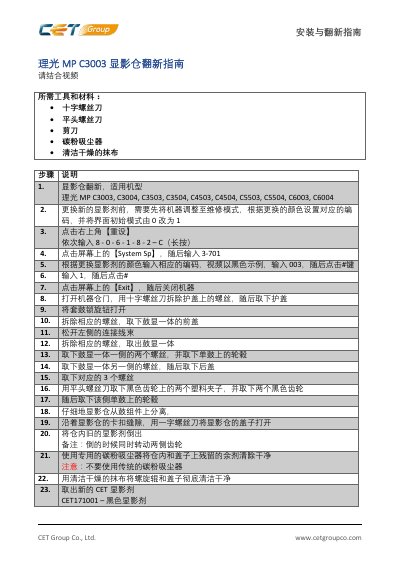
This document provides a step-by-step procedure for replacing and refilling the developer unit in Ricoh multifunction printers. It covers the necessary tools, such as screwdrivers and vacuum cleaners, and details how to access the internal components of the machine.
The guide includes specific instructions on entering maintenance mode via the printer's touchscreen interface to prepare the device for cartridge replacement. It outlines the removal of the drum assembly, separation of the developer chamber, cleaning procedures using a specialized vacuum, and the final reassembly steps. This manual is written in Chinese.
The guide is applicable to the Ricoh MP C3003, C3004, C3503, C3504, C4503, C4504, C5503, C5504, C6003, and C6004 models.
This guide applies to the Ricoh MP C3003, C3004, C3503, C3504, C4503, C4504, C5503, C5504, C6003, and C6004 models.
You must input the code 8-0-6-1-8-2-C while holding the button down.
The black developer refill is identified by the part number CET171001.