
This is a guide to install Linksys 2100 2-port ATA/Router.
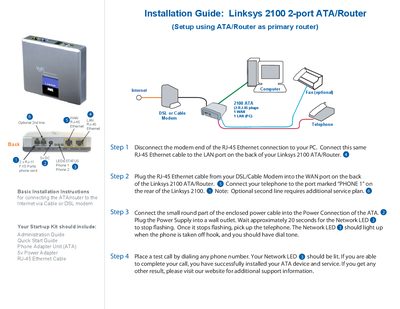
This guide provides step‑by‑step instructions for connecting the Linksys 2100 ATA/Router to your Internet service via a cable or DSL modem. It covers wiring the WAN and LAN Ethernet ports, attaching the telephone line, and powering the device.
After connecting the Ethernet and phone cables, the guide explains how to power up the unit, wait for the Network LED to stop flashing, and verify operation with a test call. Troubleshooting tips direct users to the Linksys website for additional support.
| Number of ports | 2 (ATA/Router) |
|---|---|
| WAN port type | RJ‑45 Ethernet |
| Phone ports | PHONE 1 (optional second line) |
Plug the RJ‑45 Ethernet cable from your DSL/Cable Modem into the WAN port on the back of the Linksys 2100 ATA/Router.