
Introduce the features and characteristics of the Linksys SPA901 phone
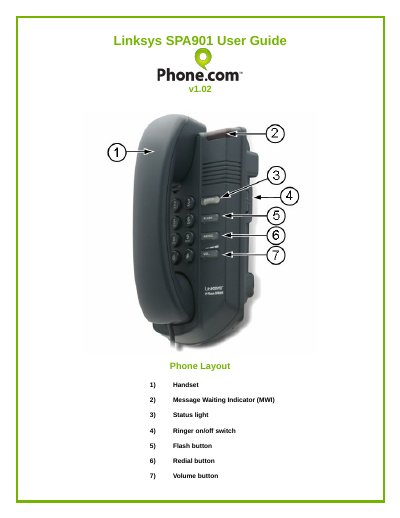
The guide starts with a description of the SPA901 phone layout, including the handset, message‑waiting indicator, status light, ringer switch, flash, redial and volume buttons. It explains the meaning of each status‑light color and how to use the ringer on/off switch.
Detailed instructions cover call handling features such as flash‑button hold, call transfer, three‑way conference, speed‑dial programming, Do Not Disturb, call recording and call blocking, as well as how to access call logs and voicemail.
| Firmware version | v1.02 |
|---|
Pick up the handset and dial * 8 6 8 6, then follow the voice prompts to listen to messages.
Dial * 7 8; you will hear a slow “stutter” dial tone as confirmation.