
JVC AVX 836/736 GPS BlackBox is a GPS navigation product that provides navigation capabilities for car-mounted dual-screen systems.
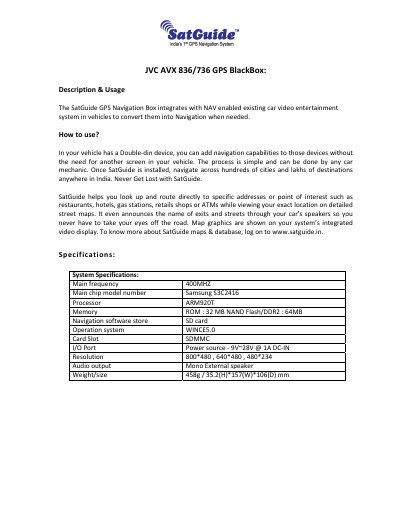
The JVC AVX 836/736 GPS BlackBox integrates with a NAV‑enabled JVC 2‑Din video entertainment system, allowing the vehicle to display navigation maps, route to points of interest, and announce street names through the car speakers. The device uses a Samsung S3C2416 ARM920T processor, WINCE5.0 OS, and stores navigation software on an SD card.
The manual details power and signal connections, how to launch the SatGuide application, troubleshooting steps, and recommended speaker placement. Installation can be performed by a mechanic without adding a separate screen, and the system works with standard 12 V vehicle power supplies.
| Main frequency | 400MHz |
|---|---|
| Main chip | Samsung S3C2416 Processor ARM920T |
| Memory ROM | 32 MB NAND Flash |
| DDR2 memory | 64 MB |
| Operating system | WINCE5.0 |
| Power source | 9V~28V @ 1A DC‑IN |
| Resolution | 800×480, 640×480, 480×234 |
| Audio output | Mono |
| Weight/size | 458 g / 35.2 mm (H) × 157 mm (W) × 106 mm (D) |
Attach the red (ACC) and yellow (ACC) cables to +12 V, connect the black ground cable to –12 V, then plug the RGB & Data cable and power cable into the BlackBox and connect the other end of the RGB cable to the JVC 836/736 2‑Din system.
Turn on the JVC KW‑AVX836 2‑Din system, enable the Navigation option in Settings, then press the “Disp” button; the SatGuide application will start on the display.
Check that the BlackBox receives power, verify all cables are properly connected, ensure the SD card is inserted correctly and not locked, and power‑cycle the system if the application hangs.