
Does not exist
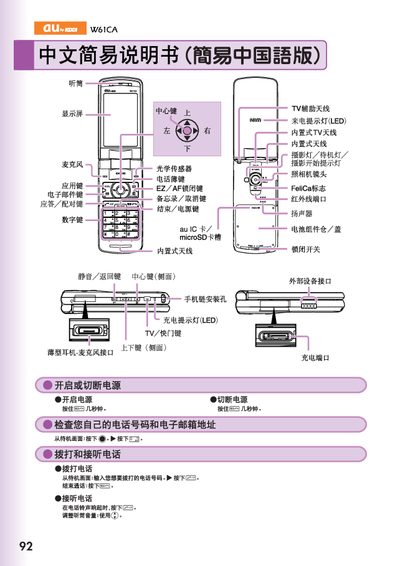
This manual explains how to operate the au by KDDI W61CA phone. It describes the layout of the display and keys, how to make and receive calls, manage the address book, send messages, and adjust volume and mute settings.
The guide also covers camera functions such as taking snapshots and recording animations, setting up voicemail, making international calls, and using additional features like voice recording. Contact information for au customer service is provided at the end. This manual is written in Chinese.
From the standby screen, press and hold the button for more than one second, then select the record to edit and press the register button to save.
From the standby screen, press and hold the shutter button for more than one second, then press the snapshot button to capture a photo.
Enter the country code followed by the phone number, for example, to call the United States dial the country code and then the number (e.g., 212‑123‑xxxx).