
This is a manual for a mobile phone, which introduces how to turn on and off the phone, make calls, answer calls, take pictures and other functions.
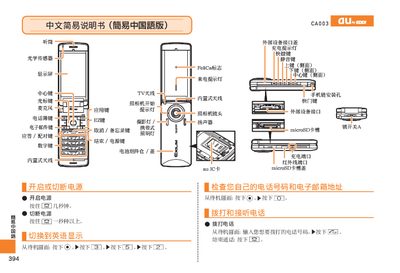
This manual provides step‑by‑step instructions for operating the au CA003 phone. It explains how to power the device on and off, make and receive calls, save contacts, and adjust volume. The guide also covers camera usage, including taking photos, recording videos, and switching between photo and animation modes.
Additional sections describe how to set mute mode, record voice memos, and make international calls. Contact information for au customer service is included for further assistance. This manual is written in Chinese.
Press and hold the power button for a few seconds.
From the standby screen, press the call key, enter the phone number, then press the send key.
Press and hold the voice memo key for more than one second to start recording; repeat to cancel.
Press and hold the mute key for a few seconds to enable mute; repeat to disable.