
This is a user manual for a phone
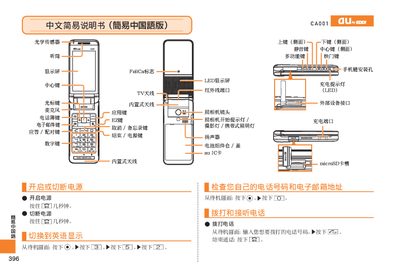
This manual provides step‑by‑step instructions for operating the au by KDDI CA001 handset. It explains how to power the device on and off, make and receive calls, manage contacts, and use the built‑in camera and voice memo features.
The guide also describes how to adjust volume, set silent mode, capture photos or animations, and access other functions such as the TV antenna and external device interfaces. Contact information for au customer service is included at the end. This manual is written in Chinese.
| Display | LED |
|---|---|
| Camera | Integrated |
Press and hold the LS] key for a few seconds.
When the phone rings, press the [sz] key.
From the standby screen, press and hold the E key for a few seconds.