
This manual describes the structure and features of the W53CA, as well as the operating methods.
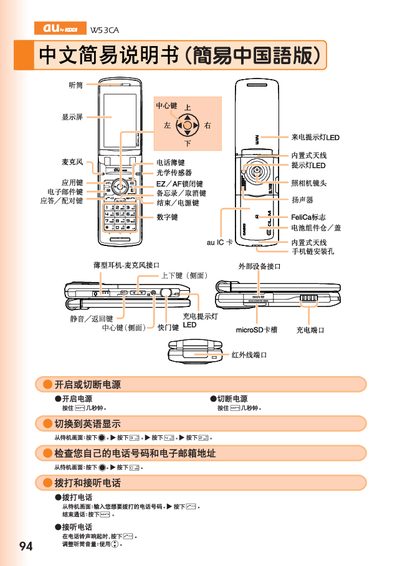
This manual provides step‑by‑step instructions for using the au by KDDI W53CA mobile phone. It explains how to save and view contacts, operate the built‑in camera for both animation and snapshot modes, and make international calls.
Additional sections cover other phone functions such as mute mode, voice mail setup, and basic hardware indicators like the LED charging light and microSD card slot. This manual is written in Chinese.
| microSD card slot | present |
|---|
From the standby screen, press and hold the save key for more than one second, then select the record you want to edit and press the register button.
From the standby screen, press and hold the camera key for more than one second, then press the capture button to take a snapshot or the animation button for video.
Enter the country code followed by the telephone number, for example to call the United States dial 212‑123‑xxxx.