
This document provides a detailed overview of the components and features of the Dell Dimension 8250 series of computers
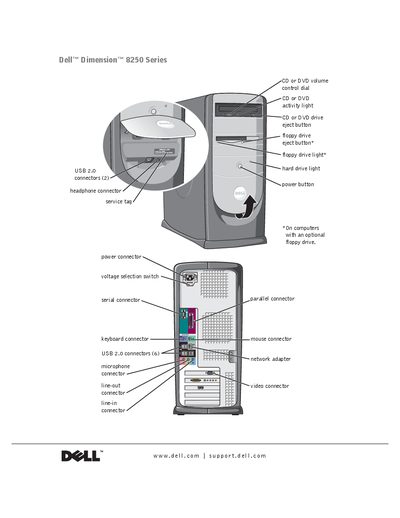
This manual covers everything needed to set up and use the Dell Dimension 8250 Series desktop, including connecting peripherals, configuring networks, and installing operating systems. It also explains ergonomic computing habits and safety precautions.
In addition to user‑level instructions, the guide details hardware maintenance such as adding memory, installing or replacing drives and cards, and using Dell Diagnostics for advanced troubleshooting. Warranty, support contacts, and regulatory information are provided at the end of the document.
The service tag is printed on the computer and referenced on page 1 of the manual.