
This is a user manual for Dell Dimension 2300
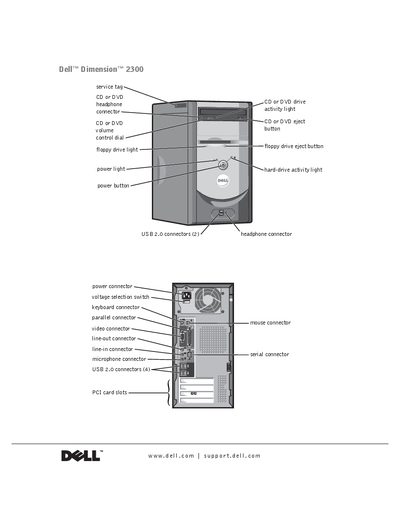
This manual covers safety guidelines, installation steps, and basic configuration for the Dell Dimension 2300 desktop. It includes detailed instructions for connecting peripherals, setting up networks, and installing operating systems.
Additional sections address hardware upgrades such as adding memory or a second CD/DVD drive, troubleshooting common problems, driver management, system restore procedures, and warranty information. The document is intended for both end users and trained service technicians.
The computer has two USB 2.0 connectors on the front and four on the back.
First unplug the cable from the network adapter on the back of the computer, then from the network jack.
Disconnect the computer from the power outlet and clean it with a soft cloth dampened with water, avoiding liquid cleaners.