
This is a user manual for Dell Dimension 5000
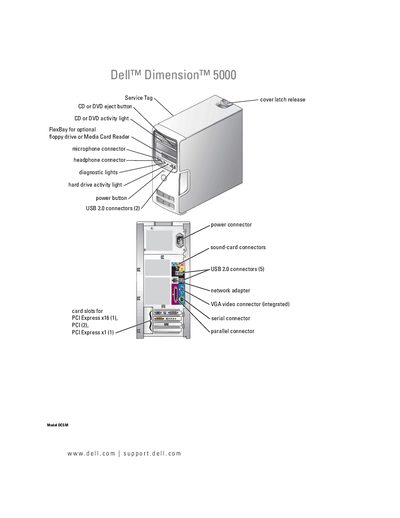
This manual covers everything needed to set up and use the Dell Dimension 5000 desktop, including connecting peripherals, configuring the operating system, and adjusting display settings. It also explains how to install optional components such as a floppy drive, media card reader, or additional hard drives.
Later sections guide technicians through hardware removal, part replacement, and detailed troubleshooting steps. Diagnostic light meanings, password recovery, CMOS clearing, and a full specifications list are included to aid both end‑users and service personnel.
| VGA video connector | Integrated |
|---|---|
| PCI Express x16 slots | 1 |
| PCI Express x1 slots | 1 |
The manual provides a step‑by‑step procedure for clearing forgotten passwords in the "Clearing Forgotten Passwords" section.
Refer to the "Clearing CMOS Settings" section for instructions on resetting the CMOS on this model.