
This document describes the various connectors and slots of the Dell™ Dimension™ XPS computer, as well as some notes and warnings.
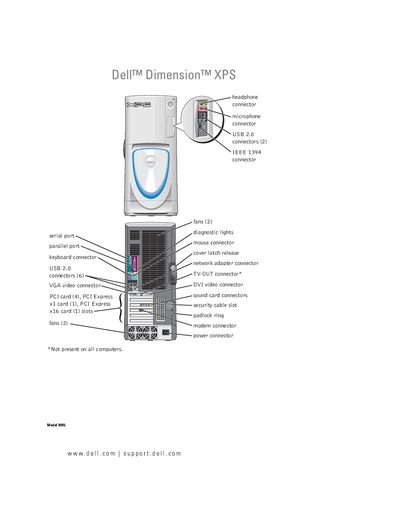
This manual covers the complete setup and use of the Dell Dimension XPS WHL desktop, including connecting monitors, configuring RAID, power management, and installing optional components. It also provides detailed instructions for accessing the BIOS, using the Network Setup Wizard, and restoring the system.
In addition, the guide includes extensive troubleshooting sections for hardware, software, and peripheral issues, as well as step‑by‑step procedures for removing and installing parts such as memory, drives, and the processor airflow shroud.
The manual includes a section titled "Replacing the Battery" that provides the step‑by‑step procedure.
Enter the BIOS by selecting "System Setup" from the boot sequence, as described in the "Entering System Setup" section.
Use the "System Restore" feature as detailed in the troubleshooting chapter.