
This document is a user manual for Dell Dimension 5150C computer. The document provides information on the various components and connectors of the computer, as well as a guide on setting up and using the computer.
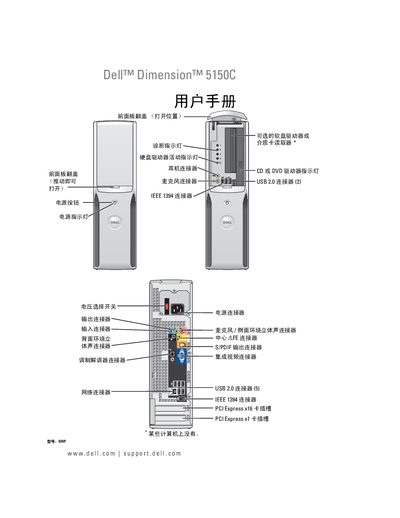
This manual covers the installation and configuration of the Dell Dimension 5150C, including connecting peripherals such as printers, USB devices, and DVD/CD drives. It also explains power‑on, standby, and sleep modes, as well as safety warnings and warranty information.
Additional sections guide users through hardware maintenance, component removal and replacement, and troubleshooting common issues like audio problems or system freezes. An index and reference tables make it easy to locate specific topics. This manual is written in Chinese.
| USB 2.0 ports | 5 |
|---|---|
| IEEE 1394 (FireWire) port | 1 |
| PCI Express x16 slot | 1 |
| PCI Express x1 slot | 1 |
The Dell Dimension 5150C provides five USB 2.0 ports.
It includes one PCI Express x16 slot and one PCI Express x1 slot.