
This document provides information about the various components and connectors of the Dell™ Dimension™ XPS computer, as well as some notes and cautions.
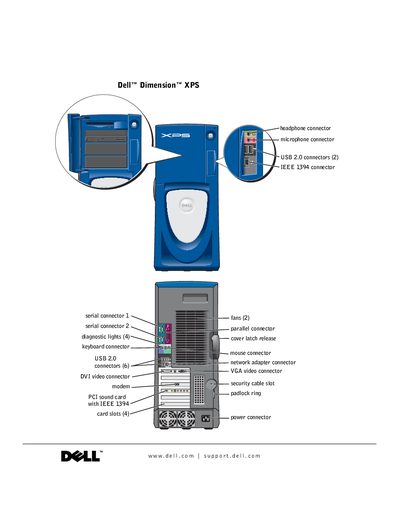
This manual covers everything you need to know to set up and use your Dell Dimension XPS computer, including safety symbols, connector locations, BIOS setup, and operating‑system installation. It also explains how to install and remove internal components such as memory, PCI cards, and drives.
Additional sections guide you through performance optimization, common hardware and software problems, and detailed troubleshooting steps. The appendix lists technical specifications, warranty information, and contact details for Dell technical support.
| Model | WHL |
|---|---|
| Release Date | December 2003 |
| PCI slots | 4 |
| USB 2.0 connectors | 2 |
| IEEE 1394 connector | 1 |
The computer has two USB 2.0 connectors.
Contact information for Dell technical support is provided on page 112.