
This document is a concise user guide that provides instructions on the operation panel, water usage, and handling of abnormal working conditions of a washing machine. Users can operate the machine using the power switch, start/pause button, and water level selection. The document also explains how to set the washing program, adjust the wash/spin time, and how to handle abnormal working conditions.
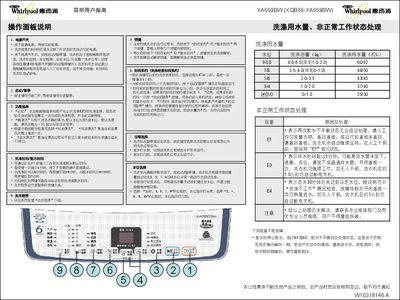
This manual explains the operation panel functions, including power, start/pause, water‑level selection, process selection, and special features such as memory, bucket cleaning, and extra rinse. It also details how to set wash time, spin time, and appointment time, and how to handle common error codes like E1, E3, and E4.
The document lists the machine's technical specifications, such as rated voltage, frequency, power consumption, capacity, dimensions, weight, and water‑pressure requirements, and provides step‑by‑step washing instructions from connecting hoses to starting a cycle. This manual is written in Chinese.
| Rated voltage | 220V ~ |
|---|---|
| Rated frequency | 50Hz |
| Rated input power | 430W |
| Wash‑spin capacity | 6.5Kg |
| Weight | 34Kg |
| Overall dimensions | 546×537×920 mm |
| Box dimensions | 530×530 mm |
| Inlet water pressure | 0.02‑0.78 MPa |
Balance the clothes manually, close the lid, and the machine will continue operating; the display will stay on E1 until the issue is resolved.
Press the appointment time key; each press adds one hour up to 12 hours. The display shows a blinking “..” during the appointment period.
E3 means the drain time exceeded 5 minutes, possibly due to a blocked or frozen drain pipe; open or clear the pipe and close the lid once to resume.