
This document is a concise user guide for the operation panel instructions and abnormal working state handling of a washing machine. It introduces functions such as power switch, washing programs, water level selection, process selection, and time reservation. It also provides information on washing water consumption and troubleshooting for abnormal working states.
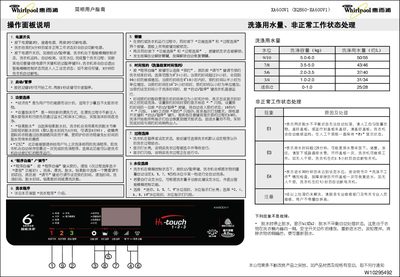
This manual explains the operation panel functions, water‑level selection, program editing, and error codes for the Whirlpool XA600V1 washing machine. It includes step‑by‑step washing procedures, how to set timers, and special functions such as Economy Wash and Gentle Spin.
Technical specifications are listed, including voltage, power consumption, capacity, dimensions and water‑pressure requirements, helping users verify installation requirements and proper use. This manual is written in Chinese.
| Rated Voltage | 220 V~ |
|---|---|
| Rated Frequency | 50 Hz |
| Rated Input Power | 400 W |
| Washing Capacity | 6.0 kg |
| Weight | 35 kg |
| Dimensions (H×W×D) | 547 mm × 559 mm × 936 mm |
| Box Dimensions | 540 mm × 540 mm |
| Water Pressure Range | 0.02–0.78 MPa |
E1 means the machine detected an unbalanced spin; distribute the laundry evenly, close the lid, and the machine will continue automatically.
Press the water‑level selection key; the indicator lights steady for mini/3/5/7/9 levels and flash for 2/4/6/8/10 levels.
Yes, use the “Program Edit” key to choose “Appointment” and adjust the desired end‑time with the “Adjust” key; the machine will start automatically at the set time.
It reduces energy consumption and is intended for small, lightly soiled loads.