
This document is an operation panel instruction for a washing machine, which introduces the use of functions such as power switch, washing program, wash time/spin time, water level selection, process selection, etc. It also provides information on water consumption and handling of abnormal working states.
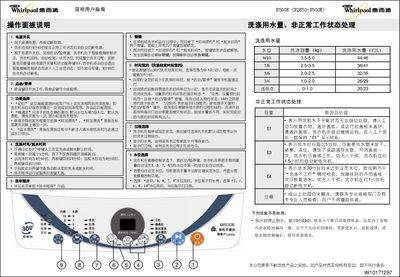
This manual explains the functions of the control panel on the Whirlpool B500E washing machine, including power, start/pause, water‑level selection, wash and spin times, program and process selection, and lock key operation. Detailed steps for loading, adding detergent, selecting cycles, and using special functions such as extra rinse, overflow rinse and tub cleaning are provided.
The guide also lists the machine’s technical specifications, error codes (E1, E3, E4) and their remedies, and instructions for setting time‑appointment, handling abnormal conditions, and performing routine maintenance. This manual is written in Chinese.
| Rated Voltage | 220V~ |
|---|---|
| Rated Frequency | 50Hz |
| Rated Input Power | 330W |
| Wash/Spin Capacity | 5.0 kg |
| Weight | 32 kg |
| Overall Dimensions | 546 × 537 × 890 mm |
| Cabinet Dimensions | 530 × 530 mm |
| Inlet Water Pressure | 0.02‑0.78 MPa |
E1 means the machine detected an imbalance during two consecutive spin cycles. Evenly distribute the laundry and close the lid, then the machine will continue operating.
Press the Time Appointment and Spin Time keys simultaneously; this locks all keys. Press the same two keys again to unlock them.
In fuzzy‑control mode press the Start/Pause key to let the machine auto‑select a water level, or press the Water Level Selection key to manually choose a level and exit fuzzy control.
E3 indicates the drain time exceeded five minutes. Check that the drain hose is not blocked, kinked or frozen, then open and close the lid once to resume draining.