
This document provides instructions for operating the washing machine control panel, including power switch, wash time/spin time, start/pause, water level selection, process selection, time reservation, and lock key functions, as well as explanations of water usage and troubleshooting for abnormal operation.
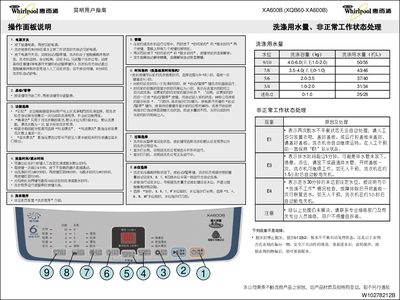
This guide provides detailed instructions for the XA600B washing machine, covering the power switch, start/pause button, water‑level selection, wash‑time and spin‑time adjustments, and program selection. It also describes how to set time reservations, lock the control panel, and use special functions such as extra rinse, overflow rinse, and tub cleaning.
The manual includes a table of wash programs with corresponding wash, rinse, and spin times, product specifications (voltage, power, capacity, dimensions, etc.), and a fault‑code section that explains error codes like E1, E3, and E4 with recommended corrective actions. This manual is written in Chinese.
| Rated Voltage | 220V~ |
|---|---|
| Rated Frequency | 50Hz |
| Rated Input Power | 400W |
| Wash/Spin Capacity | 6.0 kg |
| Weight | 34 kg |
| Overall Dimensions (H×W×D) | 546×537×920 mm |
| Box Dimensions (W×D) | 530×530 mm |
| Inlet Water Pressure | 0.02‑0.78 MPa |
Press the "Time reservation" and "Spin time" keys together to lock all nine buttons; press the same two keys again to unlock.
E1 means two unbalanced spin cycles; redistribute the laundry evenly and close the lid before the machine can continue.
Press the reservation button; each press adds one hour up to a maximum of 12 hours. The machine will start the wash when the set time is reached.