
This document provides instructions for using the Kodak Z981 camera, including battery charging, installing the strap, setting language and date/time, taking photos, viewing photos/videos, downloading software, and transferring photos.
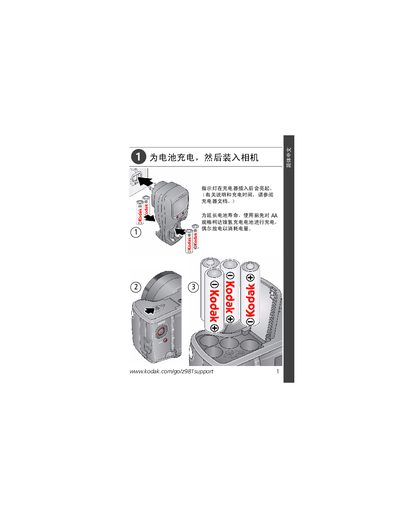
This manual explains how to prepare the Z981 camera for use, including charging the AA NiMH rechargeable battery, setting language and date/time, and using the shutter and focus controls. It also covers reviewing photos and videos on the camera’s LCD screen.
The guide details how to connect the camera to a computer via the supplied USB cable, run Kodak’s software for downloading images, and access the built‑in help system for troubleshooting and additional instructions. Regulatory and warranty information is provided at the end of the document. This manual is written in Chinese.
| Battery type | AA NiMH rechargeable |
|---|---|
| Power input | 5 V DC via USB |
Insert the battery into the charger; the indicator light will turn on once the charger is connected.
Press the Menu button, select the language/date option, adjust the fields, and press OK to confirm.
Connect the camera to a computer with the supplied USB cable; the Kodak software will launch automatically and guide you through the transfer.