
TL-WR846N is a wireless broadband router that can connect to ADSL or community broadband. Before use, you need to first connect the power adapter and computer, and then set it up according to the manual.
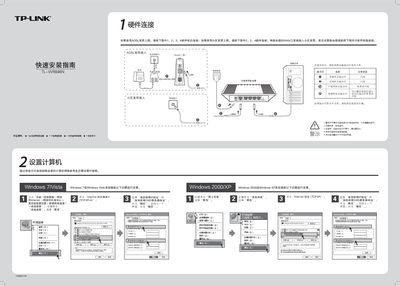
This guide explains how to connect the TL‑WR846N router to your broadband service, set up the WAN port, and verify that the router’s indicator lights are functioning correctly. It also covers the initial hardware connections for ADSL or cable broadband and the required power and placement considerations.
After the hardware is linked, the guide walks you through accessing the router’s web interface at 192.168.1.1, logging in with the default admin credentials, configuring WAN (PPPoE, DHCP, static IP) and wireless settings (SSID, WPA/WPA2‑PSK), and provides troubleshooting tips for common connection problems. This manual is written in Chinese.
| Default IP address | 192.168.1.1 |
|---|---|
| Default username | admin |
| Default password | admin |
| Wireless security options | WPA‑PSK / WPA2‑PSK |
Press and hold the QSS/RESET button for about 5 seconds; the router will restart and return to factory defaults.
Check that all cables are correctly connected, verify the WAN settings, and restart the router or the connected computer.