
Key facts
- Brand
- EverFocus
- Model
- EPHD08
- Category
- Monitoring Equipment
- Industry
- Electronics
- Documents
- 4
- Languages
- EN
- Last added
- 2014-05-07
Start here
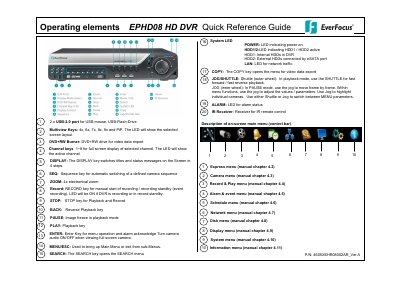
EverFocus EPHD08 HD DVR Quick Reference Guide
This document serves as a quick reference guide for the EverFocus EPHD08 HD DVR. It lists the physical operating elements on the front panel, including keys such as RECORD, STOP, PLAY, PAUSE, JOG/SHUTTLE, and various menu navigation buttons like MENU/ESC, ZOOM, SEARCH, and COPY. The guide also describes the function of system LEDs for power, HDD status, network traffic, and alarm conditions.
Read onlineEverFocus EPHD08 specifications
| Channels | 8 channel |
|---|---|
| Product Type | HD-CCTV Digital Video Recorder |
| Operating Temperature | 0°C~40°C (32°F~104°F) |
| Relative Humidity | 20%~80% |
| Input Power Source | 12VDC |
Source: EverFocus EPHD08 DVR User Manual
All EverFocus EPHD08 documents by type
Day-to-day operation, settings and troubleshooting. Start here if the product is already set up.
The shortest path to a working setup, usually only a few pages.
Questions answered in these manuals
What are the operating temperature requirements for the EPHD08?
The unit should be used at indoor temperatures between 0°C and 40°C (32°F to 104°F).
What is the required relative humidity range?
The device operates correctly at relative humidity levels between 20% and 80%.
What is the default resolution of the DVR?
The default resolution of the DVR is 1920x1080.
How do I switch between different display formats?
Press the multiview keys to switch between full screen, sequence view, and other multiscreen layouts.
How do I enable remote reboot for the DVR?
Enable the feature in the local System Menu under the Misc. screen and use the button in the web interface System Menu to reboot.
From: EverFocus EPHD08/EDR HD 4H4/2H14 Firmware Release Note January 2012
What is the Quick Archive function?
It allows users to copy the previous 10 to 90 minutes of video for all cameras to a blank DVD or USB drive by pressing and holding the COPY key.
From: EverFocus EPHD08/EDR HD 4H4/2H14 Firmware Release Note January 2012