
The Dell™ XPS™ 410 Owner's Manual describes the features and specifications of the Dell™ XPS™ 410.
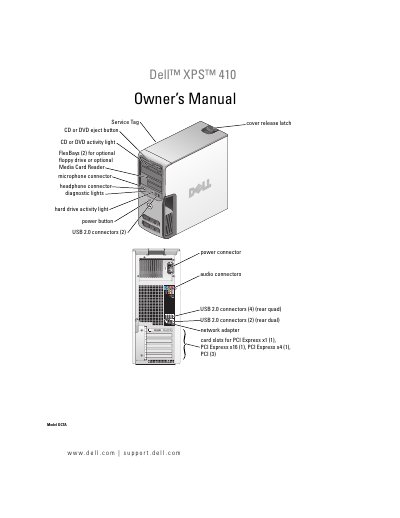
This owner's manual is for the Dell XPS 410 computer. It covers front and back views, connectors, monitor and printer setup, Internet and network setup, media use, power management, cleaning, performance optimization, RAID, diagnostics, drivers, problem solving, and parts removal and installation.
The manual also includes an appendix with specifications, system setup options, boot sequence, password and CMOS clearing, Dell technical support policy, FCC notice, contact information, a glossary, and an index.
| Processor type | Intel Pentium 4, Intel Pentium D, Intel Core 2 Duo |
|---|---|
| Level 2 cache | at least 2 MB |
| Memory type | dual-channel 533-, 667-, and 800-MHz DDR2 |
| Memory connectors | four |
| Memory capacities | 512 MB or 1 GB |
| Minimum memory | 512 MB |
| Maximum memory | 4 GB |
| Chipset | Intel P965 Express Chipset |
| DMA channels | eight |
| BIOS address | F0000h |
| BIOS chip (NVRAM) | 4 MB |
| Network interface | Integrated Intel 82566DC Gigabit Network Connection |
| System clock | 800- or 1066-MHz data rate |
| Video type | PCI Express |
The manual lists a maximum memory of 4 GB.
It identifies your computer when you use support.dell.com or contact support.
These labels are located on your computer.