
Key facts
Start here
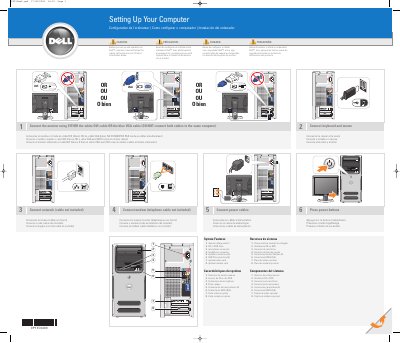
Dell 0PY350A00 Computer Setup Guide
This document serves as a setup guide for the Dell 0PY350A00 computer. It provides multilingual instructions (English, French, Portuguese, and Spanish) for connecting essential peripherals such as the keyboard, mouse, monitor, network, and modem. The guide also details the connection of power cables and optional components like remote control sensors.
Read onlineDell 0PY350A00 specifications
| Voltage Switch | manual voltage switch |
|---|---|
| CD or DVD Drive | CD or DVD drive |
| Microphone Connector | microphone connector |
| Headphone Connector | headphone connector |
| Speaker Connectors | speaker connectors (6) |
| USB 2.0 Connectors | USB 2.0 connectors (6) |
| Video Card | optional video card |
| Modem Card | optional modem card |
All Dell 0PY350A00 documents by type
Day-to-day operation, settings and troubleshooting. Start here if the product is already set up.
Questions answered in these manuals
What cables are required to connect the monitor?
You must use either the white DVI cable or the blue VGA cable, but not both simultaneously.
Where can I find more information about using the computer?
You should consult the Owner's Manual for more information about using your computer.
Which cables can be used to connect the monitor?
You can use either the white DVI cable or the blue VGA cable, but do not connect both to the same computer.
Where can I find more information about using the computer?
You should consult the Owner's Manual for more information about using the computer.