
Key facts
Start here
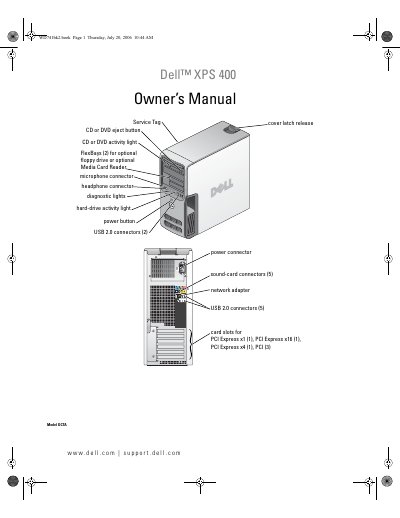
Dell XPS 400 Owner's Manual
The Dell XPS 400 Owner's Manual serves as a comprehensive guide for users and technicians, covering the setup and daily use of the desktop computer. It details how to connect peripherals such as printers, monitors, and network adapters, as well as how to manage power settings and use optional features like the Media Card Reader and Intel Viiv technology. The document also explains how to configure the system for RAID storage using Intel RAID Option ROM or Application Accelerator.
Read onlineDell XPS 400 specifications
| Processor type | Intel Pentium 4 Socket-T with Hyper-Threading technology |
|---|---|
| Cache | 1 MB or 2 MB |
| Memory type | dual-channel 400-, 533-, and 667-MHz DDR2 |
| Memory capacities | 256 MB, 512 MB, or 1 GB |
| Minimum memory | 512 MB |
| Maximum memory | 4 GB |
| Chipset | Intel 945P |
| NIC | Integrated network interface capable of 10/100 communication |
| System clock | 800- or 1066-MHz data rate |
| Video Type | PCI Express |
| Audio Type | Internal 7.1 channel or PCI option cards |
Source: Dell XPS 400 Owner's Manual
All Dell XPS 400 documents by type
Day-to-day operation, settings and troubleshooting. Start here if the product is already set up.
Disassembly, diagnostics and part numbers, for repair.
Questions answered in these manuals
What is the minimum memory required for the Dell XPS 400?
The minimum memory required is 512 MB.
How do I identify my Dell computer for support?
You can use the Service Tag located on the computer to identify it when using support.dell.com or contacting technical support.