
This guide covers installation requirements, hardware overview, configuration steps, and network setup for the Ubiquiti AF60 airFiber radio.
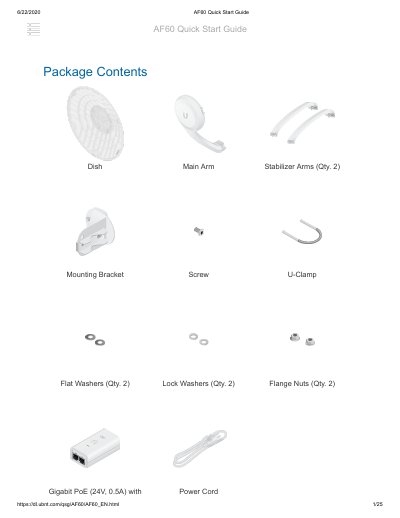
The Ubiquiti AF60 airFiber radio is a wireless networking device designed for outdoor point-to-point links. The document outlines the package contents, including the device, mounting bracket, stabilizer arms, and Gigabit PoE adapter. It specifies installation requirements such as clear line of sight, vertical mounting orientation, and the use of shielded Category 6 cabling with surge protection for outdoor environments.
| Dimensions | 413 x 413 x 320 mm (16.26 x 16.26 x 12.60") |
|---|---|
| Weight Without Mount | 1.4 kg (3.09 lb) |
| Weight With Mount | 1.8 kg (3.97 lb) |
| Enclosure Material | Aluminum, UV-stabilized Polycarbonate |
| Antenna Gain 5 GHz | 11 dBi |
| Antenna Gain 60 GHz | 38 dBi |
| Networking Interface | (1) 10/100/1000 Mbps Ethernet Port |
| Max. Power Consumption | 11W |
| Power Method | Passive PoE, Pins 4, 5+ and 7, 8- |
| Power Supply | 24VDC, 0.5A |
| Voltage Range | +22 to +26VDC |
| Default IP Address | 192.168.1.20 |
The device requires a clear line of sight, vertical mounting orientation, and at least 1 m below the highest point on the structure.
Outdoor installations require shielded Category 6 (or above) cabling and shielded RJ45 connectors.
The default IP address is 192.168.1.20, used if DHCP fails.
Press and hold the Reset button for more than 10 seconds while the device is powered on.