
This guide describes how to set up and use Windows 7 and Windows 8.
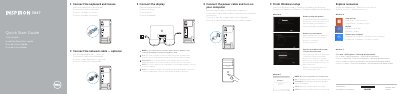
This Dell quick start guide walks through setting up the Inspiron 3847 desktop computer. It shows how to connect the keyboard and mouse, the optional network cable, the power cable, and the display, then finish Windows setup, enable security and updates, sign in with a Microsoft account or create a local account, and connect to a network. A note explains that if the computer was ordered with a discrete graphics card, the display should be connected to that card.
The guide also points to Dell help and support resources, including the Dell Help Documentation on the computer and the dell.com support pages, and lists the computer's ports and features with numbered callouts. Regulatory information includes the regulatory model and type and the NOM information for Mexico.
| Computer model | Inspiron 3847 |
|---|---|
| Regulatory model and type | D16M / D16M001 |
| Power supply voltage | 100 V AC–127 V AC / 200 V AC–240 V AC |
| Frequency | 50 Hz–60 Hz |
| Input current | 9.0 A / 4.5 A |
| Country of origin | Made in China |
| USB 3.0 ports | 2 |
| USB 2.0 ports | 2 + 4 |
Connect the display to the discrete graphics card instead of the onboard connector.
No, the guide states that the @ symbol should not be used in your password.
Dell lists dell.com/support and dell.com/support/manuals for product support and manuals.
The regulatory model is D16M (D16M001) and the computer model is Inspiron 3847.