
This document is a quick start guide for HP laptop.
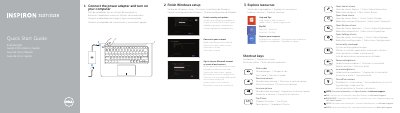
This quick start guide is for the Dell Inspiron 3137/3138 computer. It shows setup steps such as connecting the power adapter, completing Windows setup, enabling security and updates, signing in, and connecting to a network.
It also lists shortcut keys, identifies numbered features, and provides support, registration, regulatory, and safety links. Power adapter and regulatory details are included for the P19T model.
| Computer model | Inspiron 3137/3138 |
|---|---|
| Regulatory model | P19T |
| Regulatory type | P19T001/P19T003 |
| Power adapter input voltage | 100 VAC-240 VAC |
| Power adapter frequency | 50 Hz-60 Hz |
| Power adapter input current | 1.60 A/1.70 A/1.50 A/2.50 A |
| Power adapter output voltage | 19.5 VDC |
| Power adapter output current | 3.34 A/4.62 A |
| Country of origin | China |
Product support and manuals are available at dell.com/support and dell.com/support/manuals.
Contact Dell through dell.com/contactdell.
Regulatory and safety information is available at dell.com/regulatory_compliance.
The regulatory model is P19T and the regulatory type is P19T001/P19T003.