
The Dell Latitude 14 3000 Series Quick Start Guide provides information on how to use the Dell Latitude 14 3000 Series laptop.
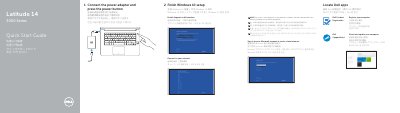
This two-page quick start guide from Dell covers the initial setup of the Latitude 14 3000 Series laptop, identified on the document as computer model Latitude 14-3470 (regulatory model P63G). It walks through connecting the power adapter and pressing the power button, finishing Windows 10 setup, enabling Support and Protection, connecting to a network, signing in with a Microsoft account or creating a local account, and locating Dell apps such as Dell Product Registration and Dell SupportAssist.
The second page lists the laptop's features with numbered callouts, including the camera, microphone, power button, security-cable slot, VGA, USB 2.0, USB 3.0 and HDMI connectors, memory card reader, optional fingerprint reader, status lights, speakers, touchpad, headset connector, network and power connectors, battery and service-tag label. It also gives Dell support, contact and regulatory web addresses and the regulatory model and type details.
| Computer model | Latitude 14-3470 |
|---|---|
| Regulatory model | P63G |
| Regulatory type | P63G001 |
| Rated voltage | 100 - 240 V |
| Rated frequency | 50 / 60 Hz |
| Rated input current | 1.7 A (65 W) / 2.5 A (90 W) |
| USB 3.0 connectors | 2 |
Connect the power adapter and press the power button, then finish the Windows 10 setup.
The guide refers to finishing Windows 10 setup.
Dell lists Dell.com/support, Dell.com/support/manuals and Dell.com/support/windows.
The computer model is Latitude 14-3470, part of the Latitude 14 3000 Series.