
This document describes the features and functions of the NETGEAR Wireless ADSL2+ N150 Modem Router DGN1000.
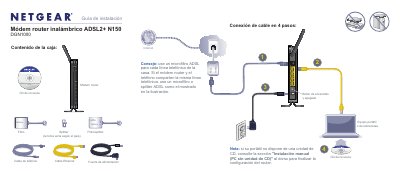
This document is the Spanish installation guide (Guía de instalación) for the NETGEAR Wireless ADSL2+ N150 Modem Router DGN1000, dated February 2012. It lists the box contents (modem router, power adapter, phone cable, Ethernet cable, filter/splitter, resource CD) and describes a 4-step cable connection, including the use of an ADSL microfilter when the modem router and a phone share the same line.
The guide also covers manual installation for Linux, Mac or PCs without a CD drive, Internet connection setup via http://www.routerlogin.net using the admin/password defaults and the Setup Wizard, the default wireless security (unique SSID and WPA/WPA2-PSK password printed on the product label), and two methods for connecting wireless devices: manual connection and WPS (Push 'N' Connect). This manual is written in Spanish.
| Product type | Wireless ADSL2+ N150 Modem Router |
|---|---|
| Default admin username | admin |
| Default admin password | password |
| Default security | Unique SSID and WPA/WPA2-PSK password on product label |
| Configuration URL | http://www.routerlogin.net |
Follow steps 1 to 3 to connect the modem router, then go to http://www.routerlogin.net, log in with admin/password and run the Setup Wizard with Auto-Detect Connection Type enabled.
Both are printed on the label on the bottom of the product and are uniquely generated for each device.
Press the WPS button on the router, then within 2 minutes press the WPS button on the wireless device or follow its WPS instructions.
No, WPS does not support WEP security; connecting a WEP client via WPS will not work.