
Introduce the instruction manual of JEOL 502 aka Ripley data processing
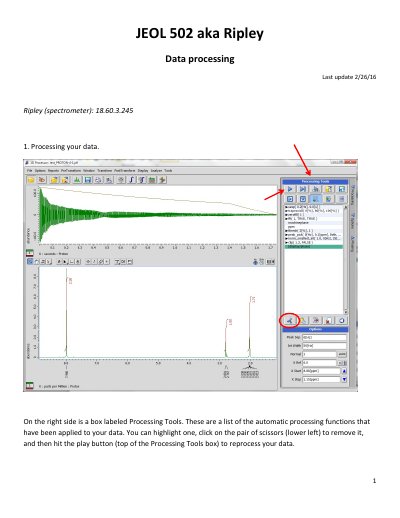
This four-page guide explains data processing steps for the JEOL 502 Ripley spectrometer software. It covers the Processing Tools box, removing and adding automatic processing functions, and using the play button to reprocess data.
It also describes zooming into spectral regions, resetting the view, manual phasing with zero- and first-order phase adjustments, moving the pivot line, and setting the reference to a selected peak.
Highlight the function in the Processing Tools box and click the pair of scissors to remove it. Then click the play button to reprocess the data.
Click the Zoom view of data button, then drag a box over the area you want to expand.
Hold down the Alt key so the pointer changes to Φ1 for the first-order phases, then slide the mouse from side to side.
Click the Paste reference to nearest peak button, type the value in the X Ref box, and left click the peak you want to use.