
This document is the user manual for ELECOM TK-FBP014E series Bluetooth Folding Keyboard
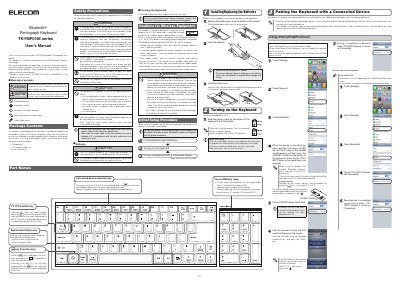
This manual guides users through installing batteries, turning on the keyboard, and pairing it with Bluetooth devices. It includes safety warnings, usage precautions, and instructions for switching between connected devices using function keys. The keyboard supports Bluetooth HID profile and is designed for use with mobile devices like iPhone, iPad, and iPod touch.
The manual also covers battery replacement, power-saving mode, and disposal instructions. It warns against using the keyboard near medical devices or in aircraft, and advises against exposing it to water, heat, or magnetic fields.
Hold down the key and the [F1] key simultaneously, then press the CONNECT button. Enter the PIN code displayed on the screen using the keyboard’s numerical keys and press 'Enter'.
The Connect/Battery lamp will flash 1 second ON/3 seconds OFF to indicate low battery.
Yes, this product can register and be used interchangeably with multiple devices. Press a key from [F2] to [F9] in place of [F1] to pair with different devices.