
EverFocus EDR HD_QIG-4605XCHD16002AR Quick Reference Guide

This is a quick reference guide for a SD+HD digital video recorder, which introduces the features and usage methods of the product.
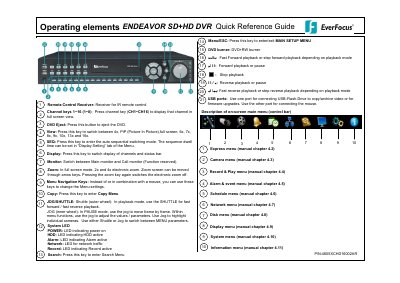

EverFocus EDR HD_QIG-4605XCHD16002AR Quick Reference Guide - cover page
Brand
EverFocus
Category
Monitoring Equipment
Document type
Quick Start Guide
Language
English
Pages
2
File format
PDF
File size
94 KB
Published
09 July, 2012
Updated
30 September, 2023
MD5 checksum
52C2762E8B8F7B1B67776FD856D98B6E

About this manual

This document serves as a Quick Reference Guide for the EverFocus EDR HD DVR, model 4605XCHD16002AR. It provides essential instructions on operating the device, including the use of front panel keys and the remote control receiver. The guide details how to navigate the on-screen menu system to adjust settings such as brightness, contrast, and color for video channels.

What's inside

  • Operating elements
  • Channel keys
  • Express menu
  • Menu Navigation Keys
  • Monitor display formats
  • Recording
  • Playback
  • Playback search
  • Archiving video data
  • Everfocus Central Management Software

Frequently asked questions

What is the function of the JOG wheel in PAUSE mode?

In PAUSE mode, use the jog to move frame by frame.

What is the maximum speed for fast forward or reverse playback?

The DVR allows playback with up to 32x speed.

How do you switch between different display formats?

Repeatedly actuating the VIEW key switches between the available display formats.

Download PDF (94 KB)

More EverFocus Manuals


View all EverFocus manuals →