
This product is an integrated cabinet that supports a variety of server and storage combinations, and also supports interconnectivity between servers and storage of different brands.
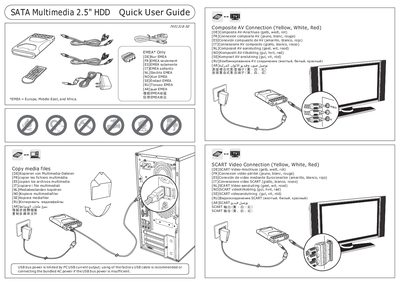
This guide provides basic information for using the SATA Multimedia 2.5" HDD. It describes the available video connections – Composite AV (yellow, white, red), SCART (yellow, white, red) and Component (green, blue, red) – and notes that USB bus power is limited by the PC’s USB current output, recommending the factory USB cable or the bundled AC power when needed.
The document also outlines simple operation steps: activating the unit for playback, using the remote control for basic functions, and stopping current playback. For detailed instructions, users are directed to the full user manual.
| USB bus power limitation | limited by PC USB current output |
|---|
Use the factory USB cable or connect the bundled AC power.
Activate the unit for playback as described in the guide.
Select the stop function on the remote control to halt playback.