
This document introduces the features and usage of W64S (Simplified Chinese version)
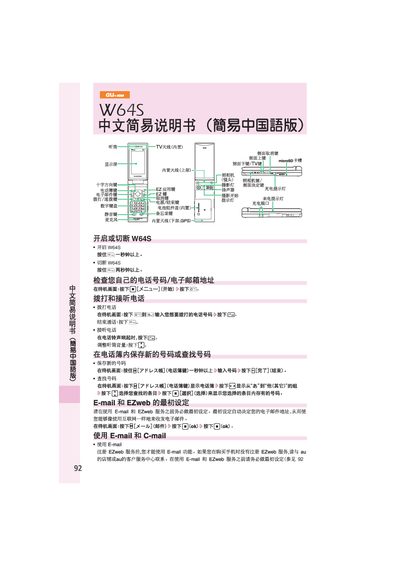
This manual explains the basic operation of the au W64S mobile phone, including how to make and receive calls, save contacts, and adjust volume. It also covers the phone’s keypad layout and indicator lights.
Additional sections describe setting up E‑mail and EZweb services, using C‑mail, taking photos with the built‑in camera, making international calls, and configuring mute or voice‑message modes. This manual is written in Chinese.
From the standby screen, press the mail key (按下日[X一小]) and then follow the prompts to create and send a new email.
Hold the camera key (按住 cs [力X与圭一]) for more than one second, then press the shutter key (按下 ecs[力X志寺一]) to capture a picture.
On the standby screen, hold the mute key (技住c=) for about one second to enable mute mode.