
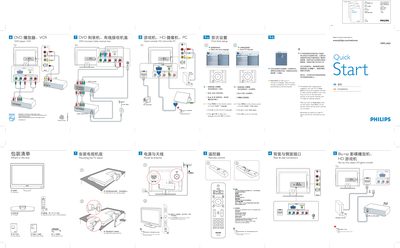
This guide provides the essential steps to get your Philips 19PFL3403 television up and running. It explains how to unpack the TV, attach the stand, connect the antenna or cable, and use the remote control to navigate the on‑screen menu. The Auto Store function can automatically scan and store available broadcast channels.
Safety notes remind you to disconnect the AC power cord before making any connections and to handle the TV carefully during installation. Basic remote‑control operations such as turning the TV on/off, selecting inputs, and confirming menu choices are also described.
Use the Auto Store function: press Install > Auto store and wait up to three minutes for the scan to complete.
Press the POWER button on the remote control to switch the TV on or put it into standby mode.
Disconnect the AC power cord before making any connections to the TV.